Meet the In-App Chat: Manage Your Garage by Just Chatting

•7 min read
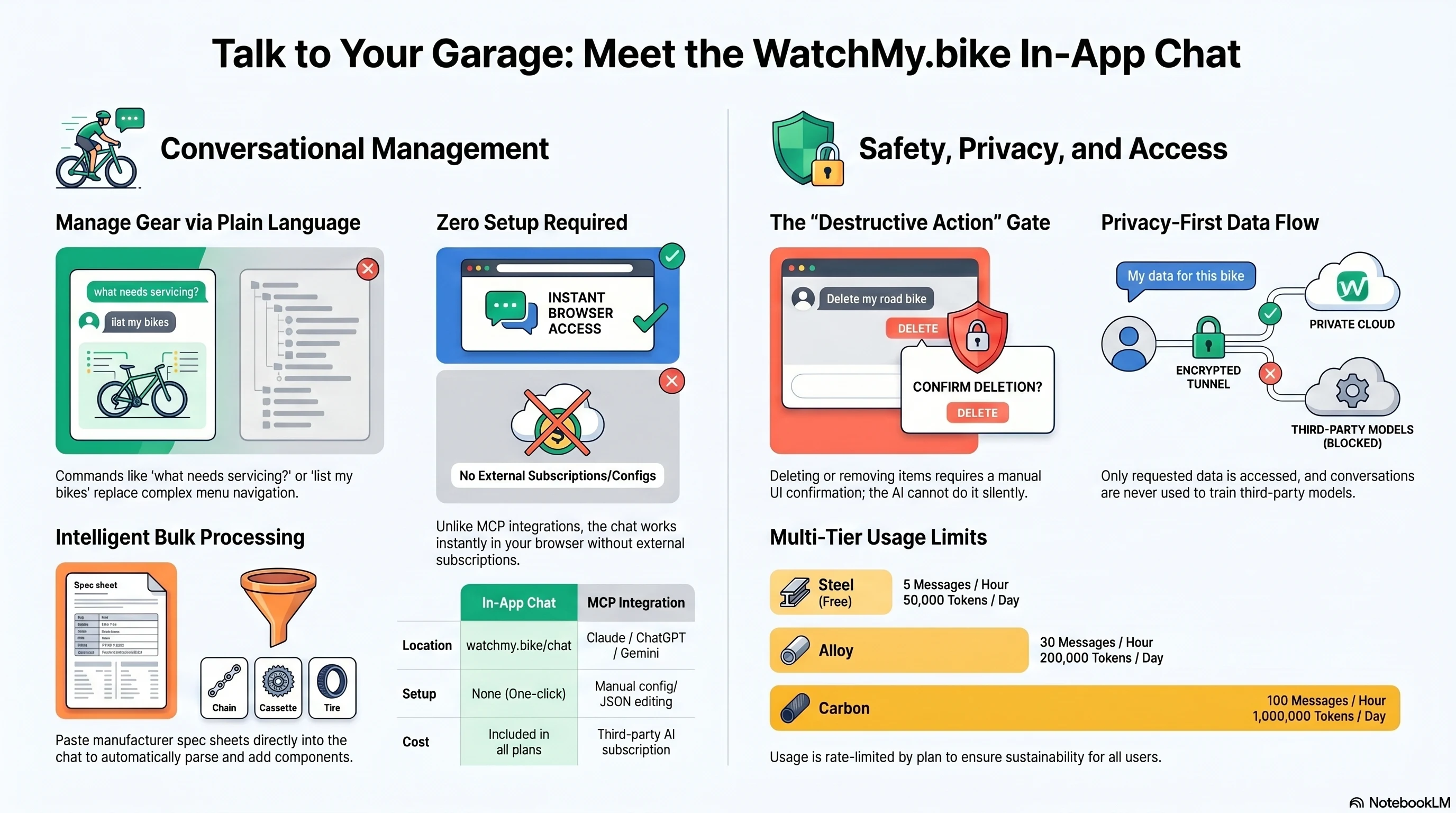
The fastest way to manage your bikes on WatchMy.bike is now to just say what you want. Open /chat in your browser, type something like "what needs servicing?" or "add a Shimano Ultegra chain to my Domane and install it today", and the assistant does the rest.
No menus to navigate. No buttons to find. No third-party AI client to install. It works on every plan — including the free Steel plan — and it's the same content as the rest of the app, just driven by conversation.
Why a chat — when there's already an MCP integration?
A few months ago I shipped the MCP integration so you could manage your garage from Claude Desktop, ChatGPT, or the Gemini CLI. That works great if you already live inside one of those tools.
But not everyone does. MCP needs:
- A subscription to Claude Pro/Max, ChatGPT Pro/Plus, or another MCP-capable client.
- A few minutes of setup — adding a custom connector, or editing a JSON config file, or running a CLI command.
- Comfort opening Settings, pasting URLs, granting OAuth scopes.
The in-app chat removes all of that. You're already logged in to WatchMy.bike, and the chat is one click away in the sidebar. There is nothing to install or configure. If you can use the website, you can use the chat.
Two paths, same destination:
| In-app chat | MCP integration | |
|---|---|---|
| Where it lives | watchmy.bike/chat | Inside Claude Desktop / ChatGPT / etc. |
| Setup | None — just open it | Add a custom connector or edit config |
| Audience | Everyone | Folks already in an AI client |
| Cost | Included on every plan, rate-limited | Your AI client subscription pays the model |
| Tools | Same set under the hood | Same set under the hood |
If you're tech-savvy and already have a Claude or ChatGPT subscription you love, MCP is still the most powerful way to work — you can stay in your existing AI tab and have your bike garage on tap. If you just want to chat with WatchMy.bike without any of that, the in-app chat is for you.
What it can do
The same things the rest of the app can do — but you ask in plain language instead of clicking around. A few examples:
- "List my bikes." — Inventory at a glance.
- "What needs servicing soon?" — Cross-bike health check.
- "How do I connect Strava?" — Searches the help docs and answers in your own language.
- "Add a new bike: Trek Domane SL7." — Creates the bike and links to its detail page.
- "Add 4,500 km to my chain — I forgot to track it for two months." — Catches you up.
- "Show the service history for my road bike." — Walks through what's been done.
- "My Continental tires are toast — retire them and add the new GP5000s I just bought." — Two operations, one sentence.
It can also handle bulk paste. Drop a spec sheet from a manufacturer page, a forum post, or your own notes, and the assistant parses it into a list of components for your review before creating any of them.
How it works (briefly)
When you send a message, the chat:
- Forwards your message + the conversation so far to our AI provider (Anthropic via OpenRouter — see the privacy page for the data flow).
- The model decides which tools it needs (list bikes, get a component, search help docs, etc.) and runs them on your account.
- Tool results come back to the model, which writes a reply you can read in plain language.
- Anything destructive — delete a bike, transfer a component, remove a service interval — pauses for an explicit confirmation in the UI before it actually runs. You can always cancel.
Read-only requests answer immediately. Mutations confirm. Nothing silent.
What it knows about you
Only what it asks for in the moment. If you say "how many km on my chain?", the assistant fetches your component list, finds the chain, and reads its distance — and only that. It doesn't upload your full account dataset to the AI provider. Your chat history is stored under your account so you can revisit it; you can delete any conversation from the sidebar at any time.
Conversations are not used to train third-party models. The privacy policy and terms of service cover the details if you want to read more.
Plan limits
The chat is rate-limited per plan to keep costs sustainable. The chat header shows your current usage and when the limits reset:
| Plan | Messages / hour | Tokens / day |
|---|---|---|
| Steel (free) | 5 | 50,000 |
| Alloy | 30 | 200,000 |
| Carbon | 100 | 1,000,000 |
Tokens are roughly the model's accounting unit — 1,000 tokens covers a typical question-and-answer exchange with one or two tool calls. A long conversation with several lookups uses more.
When you're close to the cap on Steel or Alloy, the chat surfaces an upgrade prompt to the next tier. Carbon is the top tier; once you're there the only limits are the headline numbers above.
Safety: confirm before destruction
I built the destructive-action gate first, before anything else. The model can read freely — list, get, search, check health — but it cannot delete, transfer, or unpublish anything without you confirming the action in the UI. The button literally pauses, the arguments are shown to you, and you click Confirm or Cancel.
This is by design and not bypass-able from the chat itself. If you ever want to undo a confirmation reflex, just hit Cancel and the assistant will check in with you again.
For non-destructive mistakes (a wrong bike name, a typo in a component model), edit it the normal way — the chat is also great at follow-ups: "Actually it's a Trek Domane AL5, not SL7. Update it."
Things I deliberately don't do (yet)
A few decisions worth flagging:
- No general-purpose chat. If you ask the assistant for coding help or world news, it'll politely decline and steer you back to your gear. The cost only makes sense when it's doing cycling work.
- No model choice. I picked a fast, cheap, capable default (Anthropic Haiku 4.5 at the time of writing) so the experience feels instant and the cost stays sane. If you want to use a different model, that's exactly what MCP is for — you bring your client.
- No memory across conversations. Each conversation is its own thread. The chat reads your gear data fresh each time so it stays accurate. (Cross-conversation memory is on the roadmap if it earns its keep.)
Try it
Open /chat and ask it something. "List my bikes" is a nice first prompt — it confirms everything is connected and gives you a feel for how the tool calls render inline.
If you don't have an account yet, sign up free — the chat works on the Steel plan from day one.
If you have feedback or run into something weird, email me at marien@watchmy.bike. I read every message.
Want the power-user version? See the MCP integration guide for connecting Claude Desktop, ChatGPT, or Gemini to your garage directly.