The tire pressure calculator that already knows your bike

•8 min read
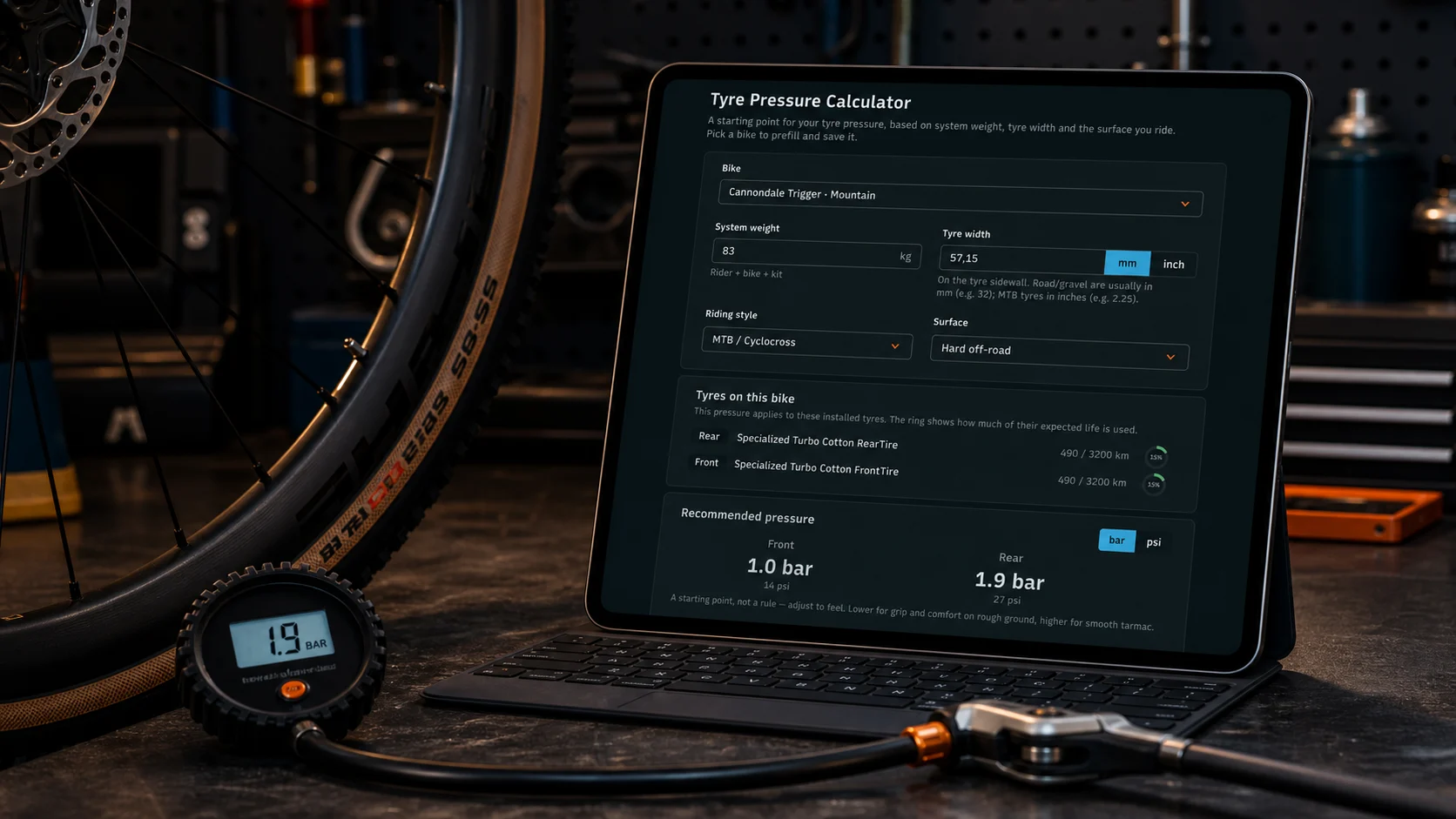
Quick answer: Optimal tire pressure comes from three things — your system weight (rider + bike + kit), your tyre width, and the surface you ride. The hard part was never the maths; it's remembering the numbers per bike and knowing your tyres are still in good shape. WatchMy.bike's tire pressure tool prefills those inputs from the bike you pick, shows the wear on the tyres actually fitted to it, and saves the result so you never re-derive it.
You bought a tire pressure calculator's worth of advice once already. You sat at a track pump, typed your weight and a tyre width into a calculator on your phone, got a number, set both tyres, and rode. It was a good number. Then you closed the tab and it was gone — and three weeks later, on a different bike, you were squeezing the tyre with your thumb and guessing again.
That's the actual problem with tire pressure. Not the formula. The formula has been solved for a decade.
The inputs were never the hard part
I'll say it plainly: every standalone tire pressure calculator solves the easy 20% of the problem and leaves you the other 80%.
The easy part is the calculation. Plug system weight, tyre width and surface into any decent model and you get a sensible front and rear number. The SILCA and Rene Herse calculators have done this well for years, and the underlying physics — lower pressure rolls faster on real roads because it cuts impedance losses, not just tyre deformation — is settled science. I dug into the why of that in tire pressure, Clik valves, and the pump that fits in your jersey pocket.
The hard part is everything around the calculation:
- You have to know your numbers — and your system weight is rider plus this specific bike plus whatever's bolted to it.
- You have to re-enter them every time, because the calculator forgets you the moment you leave.
- You have to do it per bike — your road bike, your gravel bike and your commuter want three different answers.
- And you have to trust the tyre underneath — because a calculator that doesn't know your rear tyre is three winters old hands you a number for a tyre that no longer exists.
A generic calculator can't help with any of that. It doesn't know you have three bikes. It doesn't know what's installed on them. It starts from a blank form every single time.
What changes when the calculator knows your gear
WatchMy.bike already tracks your bikes, their components and your distance. So the tire pressure tool doesn't start from a blank form — it starts from the bike you pick.
| Input | Generic calculator | WatchMy.bike |
|---|---|---|
| Rider weight | You type it, every time | Pulled from your profile |
| Bike weight | You guess, or skip it | Added from the bike's tracked weight |
| Riding style (front/rear balance) | You pick from a list | Seeded from the bike's type |
| Surface | You pick from a list | Seeded from the bike's type — gravel bike → hard-pack, MTB → off-road |
| Tyre width | You type it | A sensible default per bike type; switch mm ⇄ inch for MTB sizes like 2.25" |
| The result | Gone when you close the tab | Saved to that bike, shown on its page and your dashboard |
Pick your gravel bike and the tool already assumes a road-style weight balance on hard-pack gravel, a 40 mm tyre, and your weight plus the bike's. Pick your mountain bike and it flips to an off-road surface and inches, with a 2.25" starting point — because MTB tyres are sized in inches and a 32 mm default would be nonsense. You adjust what's wrong, not everything from scratch.
The part no standalone calculator can do: show you the tyre
Here's the bit I care about most.
The worn-tyre blind spot: A pressure number is only as good as the tyre it's for. A tyre with 4,000 km on it has a thinner, more supple casing and a flatter profile than the day you fitted it — it wants a slightly different pressure, and it's also closer to the point where pressure stops mattering and you just need a new tyre. A calculator that only knows "32 mm" can't see any of that.
When you select a bike, the tool lists the front and rear tyres actually installed on it, by name, with a wear ring showing how much of their expected life is gone. So you're not setting pressure for an abstract "32 mm road tyre" — you're setting it for your Continental GP5000 on the rear with 70% of its life used, and you can see at a glance that it's getting on. The pressure and the wear live in the same view, because in real life they're the same decision.
If you don't track your tyres as components yet, the tool still works as a plain calculator — you just type the width. But the moment your tyres are in WatchMy.bike, the calculator stops being generic.
Here's mine, straight off my own dashboard. My road bike — a Cannondale Synapse on 32 mm tyres, 95 kg system weight — comes out at 4.7 / 6.5 bar (68 / 94 psi) front and rear. My mountain bike, a Cannondale Trigger, lands at 1.0 / 1.9 bar (14 / 27 psi). Same tool, same rider: the rear tyres alone sit more than four bar apart, purely because the bikes are different. Both are saved, so they're waiting for me whenever I'm stood at the pump:
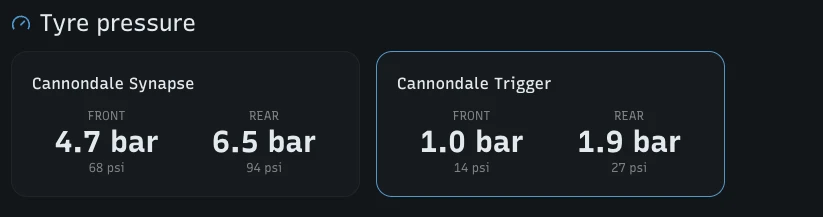
My two bikes' saved pressures on the dashboard — road on the left, trail on the right.
It's a starting point, not a commandment
One honest caveat, the same one the tool shows you: the number is a well-grounded starting point, not a rule. Pressure is personal. If the bike feels harsh on chip-seal, drop a few psi. If it feels vague and squirmy in fast corners, add a few. The calculator gets you to within a couple of psi of right on the first try — your hands do the last bit. What WatchMy.bike fixes is that once you've found your number for this bike, it's saved, it's on the dashboard, and you're not solving it from zero next month.
For the deeper physics of why lower-than-you-think is usually right, and where the breakpoint sits, read the companion post. For knowing when a tyre is simply done rather than just under-inflated, see when to replace your bike tires.
The first of a set
The tire pressure tool didn't ship alone. Alongside it is a chain wear calculator that works on the same principle: you measure your chain across a few links, and because WatchMy.bike knows the distance on that chain, it doesn't just tell you the wear percentage — it estimates how far you've got before it hits the replacement limit. (New to chain wear? Start with chain maintenance 101.)
Both are templates for the rest. The same idea — a tool that starts from your actual gear instead of a blank form — applies to most maintenance decisions. Two more I'm working on next:
- Brake pad life — read the distance on your installed pads and estimate how much is left, instead of you pulling a wheel to eyeball them.
- A service interval planner — turn "every 5,000 km" and "every 12 months" into the actual dates and distances they'll land on, across all your bikes at once.
Each one gets sharper the more you track, for the same reason the pressure tool does: it already knows your bikes. If there's a tool you'd want, tell me — the list is shaped by what people ask for.
How WatchMy.Bike makes this automatic
Set your pressure once per bike, track the tyres it's for, and let the alerts handle the rest:
- Save a tire pressure per bike — pick the bike, let it prefill, adjust to feel, save. It's on the bike page and your dashboard from then on.
- "Replace rear tire" — recurring every 4,000–5,000 km (distance), so the pressure you saved is always for a tyre that's actually fit to ride.
- "Replace front tire" — recurring every 6,000–8,000 km; fronts wear slower than rears.
Set your tire pressure and tyre alerts →
Questions about tire pressure or tracking your tyres? Reach out at marien@WatchMy.Bike.