How to Track Bike Mileage Per Component (Because Your Odometer Lies About Every Part)

•6 min read
Quick answer: the only wear number that matters is kilometres since install, per part — not your bike's total. Track it one of four ways: a paper log (free, dies at the first forgotten entry), a spreadsheet with install-date columns (works until a part moves between bikes), Strava's web-only components list (a passive counter with no alerts and no transfers), or a dedicated tracker that binds each part's distance to its install period automatically.
Your bike says 8,000 km. Useful number? It's not the chain's number — you replaced that in spring, so the chain is at maybe 900 km. It's not the cassette's number — that survived two chains and sits around 5,000 km. It's not the front tire's number either, because you swapped wheelsets before that gravel weekend. The bike's odometer is an average of parts that were never on the bike at the same time.
That matters because every replacement threshold is per-component. A chain is done at 0.5% elongation, typically 3,000-5,000 km; a cassette should outlive 2-3 chains; a rear tire is finished around 3,000-6,000 km. None of those thresholds can be checked against a bike-level total. Ride two bikes and it gets worse — the part you're worried about might have accrued distance on both.
The odometer myth: a bike odometer — including Strava's gear total — is not maintenance tracking. It's a number that goes up with nothing watching it. Knowing your bike did 8,000 km tells you nothing actionable when the chain is 900 km old and the cassette is 5,000. Strava does have a components page buried in the website (most riders have never seen it — it's not in the app), but it's still just a counter: no alerts, no service records, no moving parts between bikes. Tracking without thresholds is trivia.
Understand Why Bike-Level Mileage Misleads
Three ordinary situations break the bike odometer as a wear gauge:
- Mid-life replacement. Any part swapped after day one — chain, tires, pads, cables — is younger than the bike. That's most parts, most of the time.
- Parts that move. Wheelsets rotate between road and winter bikes; a saddle or power meter migrates to the new frame. Their distance accrues across bikes, and no single odometer sees it.
- Multiple bikes. Your weekly volume splits across two or three bikes, so any per-bike total understates how fast your riding actually consumes shared parts.
Run a Spreadsheet (and Know Where It Breaks)
The classic fix is a sheet with install-date columns. It works, and it's free:
| Component | Installed | Bike km at install | Bike km now | Component km |
|---|---|---|---|---|
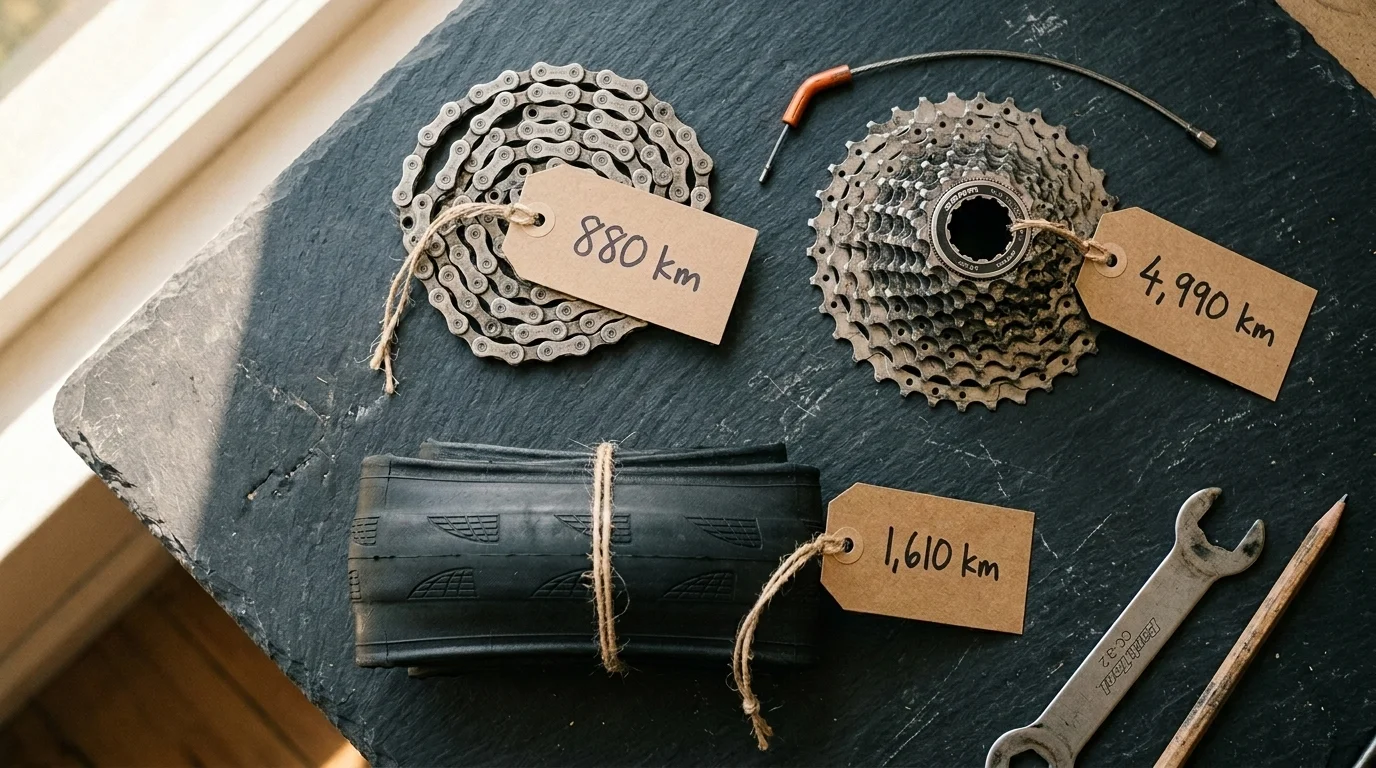
| Chain (CN-M8100) | 14 Mar | 6,210 | 7,090 | 880 |
| Cassette | 3 Jun 2024 | 2,100 | 7,090 | 4,990 |
| Rear tire | 20 Jan | 5,480 | 7,090 | 1,610 |
The logic is sound: component km = bike km now − bike km at install. The failure modes are human:
- The "bike km now" column is manual. You copy it from Strava every time you want an answer, or the sheet is stale.
- One forgotten swap corrupts a row forever. Fit a chain, forget the sheet for three weeks, and the install-km cell is a guess.
- Transfers need surgery. Move a wheelset to another bike and you're maintaining paired rows across two sheets, subtracting date ranges by hand.
- It records distance, not decisions. No thresholds, no reminders — you still have to open the sheet and think.
A paper workshop log fails the same way, just faster and without formulas.
Use Strava's Gear Tracking for What It Is
Strava's gear feature earns its place: assign a bike to each ride and the per-bike totals are automatic and accurate. On the website (not the app) you can even add components to a bike and retire them when replaced.
The limits are structural, though. One component per type per bike, retired components can never be un-retired, nothing transfers between bikes, and there are no service intervals or notifications — the counter just climbs. It answers "how far has this bike gone?" and stops there. For a full comparison of what tracks what, see the bike tracking apps comparison.
Automate It: Distance Bound to Install Dates
The model that actually fits how bikes work: every component has install and uninstall dates, and it only accrues distance from rides that happened while it was installed on that bike. Swap a part off and its counter freezes. Move it to another bike and it keeps its history and continues counting there.
That's how WatchMy.bike works — Strava sync feeds the rides, install periods slice the distance per part, and each component carries a wear percentage against its expected lifespan. The broader system (service records, logbook, alerts) is covered in How to Track Bike Maintenance.
Compare the Four Methods
| Method | Per-component accuracy | Swaps & transfers | Alerts | Ongoing effort |
|---|---|---|---|---|
| Paper log | Only as good as your memory | Manual entry, easily missed | None | High, every ride |
| Spreadsheet | Exact — until one swap goes unlogged | Manual formula surgery across sheets | None | Medium, every check |
| Strava gear | Automatic per bike; counters per component | No transfers; retire is one-way, web-only | None | Low |
| Dedicated tracker | Automatic per component, per install period | Transfers keep history | Distance/time/hours | Low — log the swap, done |
Whichever you pick, pair it with real thresholds — the component lifespan chart has the numbers to track against.
How WatchMy.Bike Makes This Automatic
Connect Strava once and every ride flows to the right bike; install and uninstall dates do the per-part slicing without a spreadsheet in sight. Transfers between bikes take one action and the component keeps its full history.
Set up these alerts and the mileage watches itself:
- "Measure chain wear" — recurring every 1,000 km on the chain itself, not the bike
- "Check rear tire" — lifespan alert at 3,000 km since install
- "Inspect brake pads" — recurring every 6 months as a calendar backstop
Set up your first maintenance alert →
Questions about tracking component mileage? Reach out at marien@WatchMy.Bike.